
Most people don’t read websites word by word.
They scan, skim and scroll, looking for signals that a page is useful. If they don’t find those signals quickly, they move on. The School of UX – GLA Skills B…
Understanding this behaviour changes how we write for the web.
What users actually do
Online readers typically:
• scan headings and subheadings
• look for bold words and links
• focus on the top of the page
• jump between sections instead of reading everything The School of UX – GLA Skills B…
In short, people are hunting for meaning, not reading line by line.
What skimming readers notice
When people skim, they often pick up:
• the first two words of sentences
• keywords that carry meaning
• links or bold text
• the first few bullet points in lists The School of UX – GLA Skills B…
This means the opening words of your sentences matter more than you think.
Bad example:
There are many ways our platform can help improve team workflows.
Better:
Improve workflows with simple automation tools.
A UX exercise that changed how I write
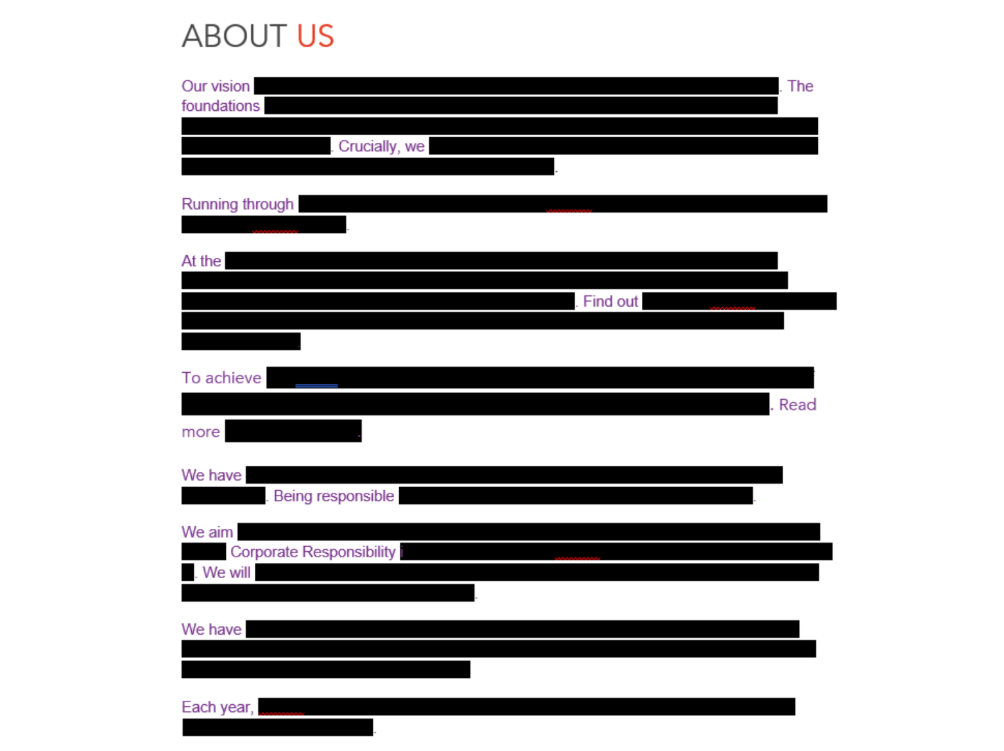
During a UX writing session with Felice Hawley at the School of UX, she showed us an example where most of a page’s text was blacked out, leaving only the first two words of each sentence visible.
The result was revealing.
Many pages suddenly stopped making sense.
It showed exactly what a skimming reader might actually take in.
That experiment stuck with me.
So when I got home, I tried to recreate the idea as a practical tool I could use while reviewing websites.
Turning the idea into a simple browser tool
After a bit of research, I installed a browser extension that lets you run custom scripts.
I then used a small script that:
• hides all text after the first two words
• works on any website
• lets you toggle the effect on and off
This makes it easy to test whether your content still communicates its message when skimmed.
The instructions and script are included below.
How to try it yourself
- Install Tampermonkey
- Enable Developer Mode in your browser and allow User scripts
- Create a new script in Tampermonkey
- Remove the default code and paste in the code (below) and save it
- Visit any site and click Toggle blackout
- Refresh the page to reset it fully
// ==UserScript==
// @name         Blackout after first 2 words of each sentence
// @namespace    local
// @version      2.0
// @description  Toggle a skim-reading view by keeping only the first 2 words of each sentence visible
// @match        http://*/*
// @match        https://*/*
// @run-at       document-idle
// @grant        GM_registerMenuCommand
// ==/UserScript==

(() => {
  "use strict";

  const STYLE_ID = "pk_blackout_style";
  const ATTR = "data-pk-blackout";
  const WRAPPER_CLASS = "pk-blackout-wrapper";
  const SKIP_SELECTOR = [
    "script",
    "style",
    "noscript",
    "textarea",
    "input",
    "select",
    "option",
    "button",
    "code",
    "pre",
    "svg",
    "canvas",
    "audio",
    "video",
    "iframe"
  ].join(", ");

  let observer = null;
  let menuRegistered = false;

  function injectStyle() {
    if (document.getElementById(STYLE_ID)) return;

    const style = document.createElement("style");
    style.id = STYLE_ID;
    style.textContent = `
      html[${ATTR}="1"] .pk-redact {
        background: #000 !important;
        color: transparent !important;
        border-radius: 2px;
        padding: 0 2px;
      }

      html[${ATTR}="1"] .pk-keep {
        color: inherit !important;
        background: transparent !important;
      }
    `;
    document.head.appendChild(style);
  }

  function isSkippableElement(el) {
    if (!el) return true;
    if (el.closest(SKIP_SELECTOR)) return true;
    if (el.isContentEditable) return true;

    const computed = window.getComputedStyle(el);
    if (computed.visibility === "hidden" || computed.display === "none") return true;

    return false;
  }

  function splitIntoSentences(text) {
    return text.match(/[^.!?]+[.!?]*|\s+|.+$/g) || [text];
  }

  function tokenizeSentence(sentence) {
    return sentence.split(/(\s+)/);
  }

  function buildProcessedFragment(text) {
    const sentences = splitIntoSentences(text);
    const fragment = document.createDocumentFragment();
    let hasHiddenText = false;

    for (const sentence of sentences) {
      if (!sentence) continue;

      if (!sentence.trim()) {
        fragment.appendChild(document.createTextNode(sentence));
        continue;
      }

      const tokens = tokenizeSentence(sentence);
      let wordCount = 0;

      const keepSpan = document.createElement("span");
      keepSpan.className = "pk-keep";

      const redactSpan = document.createElement("span");
      redactSpan.className = "pk-redact";

      for (const token of tokens) {
        if (!token) continue;

        const isSpace = /^\s+$/.test(token);
        const isWordLike = !isSpace && /[^\s.!?,;:()[\]{}"“”'‘’/\\-]/.test(token);

        if (isWordLike) {
          wordCount += 1;
        }

        if (wordCount <= 2) {
          keepSpan.appendChild(document.createTextNode(token));
        } else {
          redactSpan.appendChild(document.createTextNode(token));
          if (!/^\s+$/.test(token)) hasHiddenText = true;
        }
      }

      if (wordCount <= 2) {
        fragment.appendChild(document.createTextNode(sentence));
      } else {
        const sentenceWrapper = document.createElement("span");
        sentenceWrapper.appendChild(keepSpan);
        sentenceWrapper.appendChild(redactSpan);
        fragment.appendChild(sentenceWrapper);
      }
    }

    return hasHiddenText ? fragment : null;
  }

  function processTextNode(node) {
    const text = node.nodeValue;
    if (!text || !text.trim()) return;
    if (!node.parentElement) return;

    const parent = node.parentElement;
    if (isSkippableElement(parent)) return;
    if (parent.closest("." + WRAPPER_CLASS)) return;

    const processed = buildProcessedFragment(text);
    if (!processed) return;

    const wrapper = document.createElement("span");
    wrapper.className = WRAPPER_CLASS;
    wrapper.setAttribute("data-pk-original", text);
    wrapper.appendChild(processed);

    node.replaceWith(wrapper);
  }

  function walkAndProcess(root = document.body) {
    if (!root) return;

    const walker = document.createTreeWalker(root, NodeFilter.SHOW_TEXT);
    const textNodes = [];
    let current;

    while ((current = walker.nextNode())) {
      textNodes.push(current);
    }

    textNodes.forEach(processTextNode);
  }

  function restoreOriginalText() {
    document.querySelectorAll("." + WRAPPER_CLASS).forEach((wrapper) => {
      const original = wrapper.getAttribute("data-pk-original");
      if (original == null) return;
      wrapper.replaceWith(document.createTextNode(original));
    });
  }

  function startObserver() {
    if (observer) observer.disconnect();

    observer = new MutationObserver((mutations) => {
      if (document.documentElement.getAttribute(ATTR) !== "1") return;

      for (const mutation of mutations) {
        for (const node of mutation.addedNodes) {
          if (node.nodeType === Node.TEXT_NODE) {
            processTextNode(node);
          } else if (node.nodeType === Node.ELEMENT_NODE) {
            if (!isSkippableElement(node)) {
              walkAndProcess(node);
            }
          }
        }
      }
    });

    if (document.body) {
      observer.observe(document.body, {
        childList: true,
        subtree: true
      });
    }
  }

  function stopObserver() {
    if (observer) {
      observer.disconnect();
      observer = null;
    }
  }

  function enableBlackout() {
    injectStyle();
    document.documentElement.setAttribute(ATTR, "1");
    walkAndProcess();
    startObserver();
  }

  function disableBlackout() {
    document.documentElement.removeAttribute(ATTR);
    stopObserver();
    restoreOriginalText();
  }

  function toggleBlackout() {
    const isOn = document.documentElement.getAttribute(ATTR) === "1";
    if (isOn) disableBlackout();
    else enableBlackout();
  }

  function initMenu() {
    if (menuRegistered) return;
    GM_registerMenuCommand("Toggle blackout", toggleBlackout);
    menuRegistered = true;
  }

  initMenu();
})();
This tool is a practical approximation of skimming behaviour. On simpler pages it works well, but on more complex websites the structure of links, spans and inline elements can make the blackout effect imperfect.
The UX takeaway
If your first words don’t carry meaning, skimmers will miss your message.
Strong UX writing:
• front-loads meaning
• uses clear keywords
• breaks information into chunks
• makes the next action obvious
Because online, attention is earned in seconds.


Leave a Reply